OpenClaw: a self-hosted AI assistant for your stack
Audio playback is not available in this browser.
Client :
I keep hearing about OpenClaw to run an AI assistant on my own server.
What is it exactly? And what are the security risks if I self-host it?
Me :
OpenClaw is a self-hosted personal AI assistant.
It doesn’t replace ChatGPT or Claude as model providers; it adds an orchestration layer that connects models (OpenAI, Anthropic, local models via Ollama, etc.) to your channels (WhatsApp, Slack, Discord, email, WebChat…).
The key idea: you control where the assistant’s “brain” runs, instead of delegating everything to a SaaS.
1. How OpenClaw works in practice
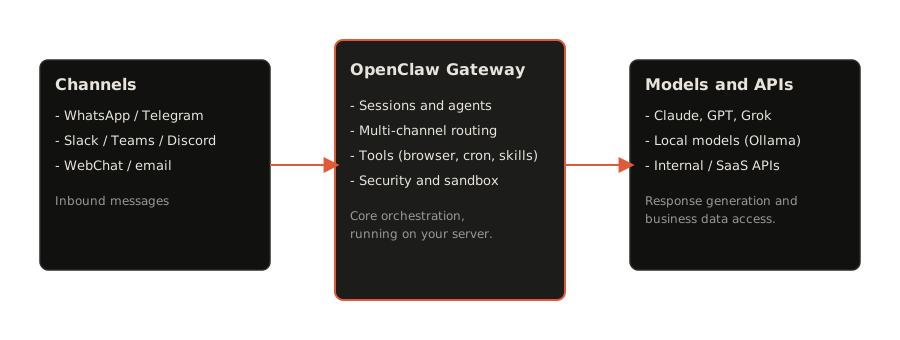
OpenClaw acts as a gateway:
- Inputs: messages coming from your channels (WhatsApp, Telegram, Slack, Discord, etc.), scheduled tasks, or webhooks.
- Core: the OpenClaw Gateway, which manages sessions, agents, security rules, integrations, tools (browser, cron, skills…).
- Outputs: calls to the models you choose (Claude, GPT, Grok, local models) and to your internal APIs (CRM, internal tools…).
Everything is driven by a configuration file and a main agent that decides which model to use, which tool to call, and where to send the answer back.
How OpenClaw compares to n8n
n8n is a workflow automation tool (node-based “when X then do Y” pipelines), often self-hosted like OpenClaw. People often ask: which one to choose, or can they work together?
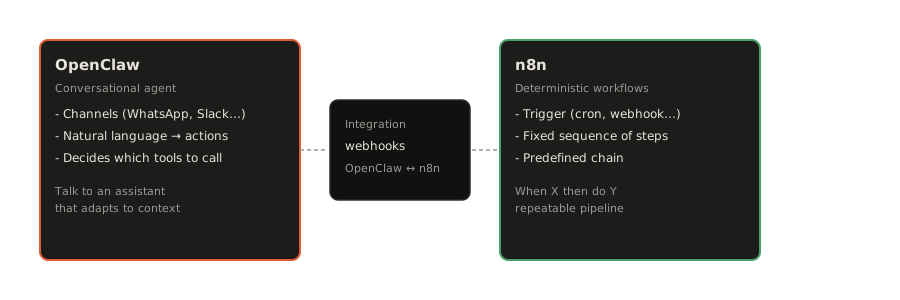
- n8n is best for deterministic chains: a trigger (webhook, cron, form, email…) runs a fixed sequence of steps (enrich data, write to a sheet, send a message, call an API). You can add an LLM call via an HTTP node, but the “brain” is the workflow, not a conversational agent.
- OpenClaw is agent-first: an input (message on a channel, scheduled task, webhook) is interpreted in natural language by a model; the agent decides which tools to call, in what order, and replies in a conversational way. It’s built for “talk to an assistant that does things for me” rather than “always run this exact sequence.”
In practice, the two complement each other: use n8n for stable, repeatable pipelines (CRM sync, daily reports, alerts), and OpenClaw for the conversational entry point and cases where the next step depends on context. OpenClaw can trigger n8n workflows via webhooks, and n8n can call or notify OpenClaw. Choose by need: fixed workflow → n8n; assistant that reasons and adapts → OpenClaw.
Concrete use cases for OpenClaw
1. Multi-channel assistant hub
You can turn OpenClaw into a single assistant hub across channels:
- answer customer DMs on WhatsApp or Telegram,
- handle internal requests on Slack/Teams,
- centralize notifications (Gmail, GitHub, monitoring, etc.).
The benefit: one brain (your rules, your models), multiple doors.
2. Lightweight automation around your business
Examples that don’t require a big engineering team:
- send a daily digest to a Slack channel with key messages from the previous day,
- summarize newly opened GitHub issues overnight,
- generate first-draft replies for customers that humans review before sending.
OpenClaw becomes an automation layer between your tools and your models.
3. Exploring advanced agent scenarios
For more technical profiles, OpenClaw lets you experiment with:
- specialized agents per channel (support, sales, tech),
- custom skills that call your internal APIs,
- complex cron + webhook flows.
You can prototype focused assistants without rebuilding infrastructure from scratch each time.
Main risks and security considerations
Self-hosting OpenClaw gives you control, but also shifts part of the security responsibility to you.
1. Exposing the Gateway interface
If you expose the interface on the public Internet:
- treat it as a real attack surface,
- never expose a raw port without authentication and HTTPS,
- follow the Security section of the official docs first.
Good practice:
- keep the Gateway on
localhost, - access it via Tailscale or another VPN,
- or restrict IPs aggressively via the firewall / security group.
2. Channel and data access
OpenClaw connects to your real channels (WhatsApp, Slack, Gmail…).
If an account is compromised, or a token leaks, an attacker could:
- send messages “as you”,
- access private conversations or customer data.
So you should:
- store secrets (tokens, API keys) in protected files (
~/.openclaw/credentials) or a proper secrets manager, - give technical accounts the minimum required scopes,
- monitor logs and bot activity regularly.
3. DM pairing and sandboxing
OpenClaw ships with several safety defaults:
- DM policy set to pairing: unknown senders get a pairing code and the bot does not process their message until you approve them,
- ability to sandbox non-main sessions (groups, public channels) inside per-session Docker containers.
I strongly recommend:
- keeping DM policy in pairing mode until you are comfortable with the security model,
- enabling sandboxing for public groups before exposing anything externally.
4. Models and sensitive data
Even if the Gateway runs on your own server, the models themselves might still be remote:
- if you use Claude / GPT / others via API, prompts and snippets of data are sent to those providers,
- for highly sensitive data, prefer self-hosted models via Ollama, vLLM, or internal backends.
Visual explanation
The diagram at the top of this article summarizes the OpenClaw architecture: how channels (WhatsApp, Slack, etc.) connect to the Gateway, which then calls models and your internal APIs. It helps align IT, product, and business teams on what “self-hosting an AI assistant” means in practice.
References and further reading
For up-to-date technical details, always rely on the official documentation:
- GitHub repository:
openclaw/openclaw - Getting started:
https://docs.openclaw.ai/start/getting-started - Documentation & install:
https://docs.openclaw.ai/install - Security guide:
https://docs.openclaw.ai/gateway/security
As with any AI adoption, start small, measurable, and reversible.
A single well-scoped assistant on a clear, high-value use case is much safer than a vague “general assistant for everything.”